March 8, 2026
My Tools for Writing 99% of Code with AI
I’ve written 99%+ of my code with AI since late 2025. Prototypes and production code, shipped at Quora and Poe to hundreds of millions of monthly users.
That number was already 80%+ by summer 2025, months before most teams started taking agentic coding seriously. Antirez (the creator of Redis) wrote that writing code is “no longer needed for the most part.” Jack Dorsey laid off 40% of Block, citing AI productivity gains. But most of the conversation is still about whether this shift is happening.
I care more about a different question: once the agents are good, what actually becomes the bottleneck?
If you’re already using Claude Code, Codex, or similar tools daily, you’ve probably noticed: the bottleneck used to be writing code. Now it’s you. Agents wait on you to approve stuff, review diffs, and decide what to do next.
| Tool | Why I use it |
|---|---|
| Claude Code CLI | Its config unlocks agent autonomy |
| Conductor | Parallel agents on side projects |
| Codex macOS App | Inline steering via code comments |
| Happy | Approve agent actions from my phone |
| agent-browser + Playwright Interactive | Agent self-testing |
| Entire | Audit trail for AI-generated code |
| Claude Cowork | Browser task automation |
| Typeless | Voice input with auto-reformatting |
| Notion AI, ElevenLabs, Poe, alphaxiv | Long-tail productivity |
1. Keep Agents Unblocked
The first thing that breaks when you scale up agent usage isn’t code generation. It’s idle time. Agents spend huge amounts of time waiting on approvals, waiting on another agent to finish, waiting on you to decide what’s next.
Claude Code CLI
Claude Code is my daily driver during full-time work because I’m on a remote devbox with no GUI. Once you accept that constraint, the real question isn’t “Claude Code or not?” It’s “how do I configure it so the agent keeps moving without me babysitting it?”
Three setup choices made a big difference:
Sandbox mode via the /sandbox command reduces how often I need to approve agent actions. Without it, the agent asks for permission on almost everything, and I’d constantly forget to approve, leaving the agent blocked for hours doing nothing. Sandbox mode lets the agent run autonomously so I can actually focus on other things.
iTerm2 notifications via terminal config ensure that when approval is needed, I get a ping immediately. Before I set this up, I’d come back to find agents that had been blocked for 20 minutes waiting on me. That’s the bottleneck problem in miniature.
Skills are one of the most powerful features. Claude Code ships with official skills like /frontend-design (generates production-grade UI with high design quality) and /simplify (reviews your changed code for reuse, quality, and efficiency, then fixes issues). /insights is another official skill I run. It analyzes your past 30 days of usage and tells you where you’re losing time - skills you should create, CLAUDE.md rules to add, workflow habits to fix. You can also create custom skills that encode your team’s patterns and conventions.
For a large codebase, the real difference is pairing a good CLAUDE.md with org-specific skills that know how your team works: how you structure services, what your deployment pipeline expects, which patterns to use. It turns Claude Code from a generic agent into one that actually knows your org.
One area that still needs work: Agent Teams. One agent acts as a team lead, spawning multiple “teammate” sessions that work independently and communicate via a shared task list.
The idea is great. In practice, I watched the lead agent kill and restart a sub-agent because it was in deep exploration mode and didn’t respond within 30 seconds - micromanagement energy! Hopefully once Anthropic posttrains their models on this mode, the coordination gets less chaotic.
Conductor
Conductor is how I run multiple Claude Code agents in parallel on side projects. Most coding agent UIs bolted AI onto an existing editor. Conductor started from the other end, building around agents first, and it’s the closest thing I’ve found to a proper UI for this workflow.
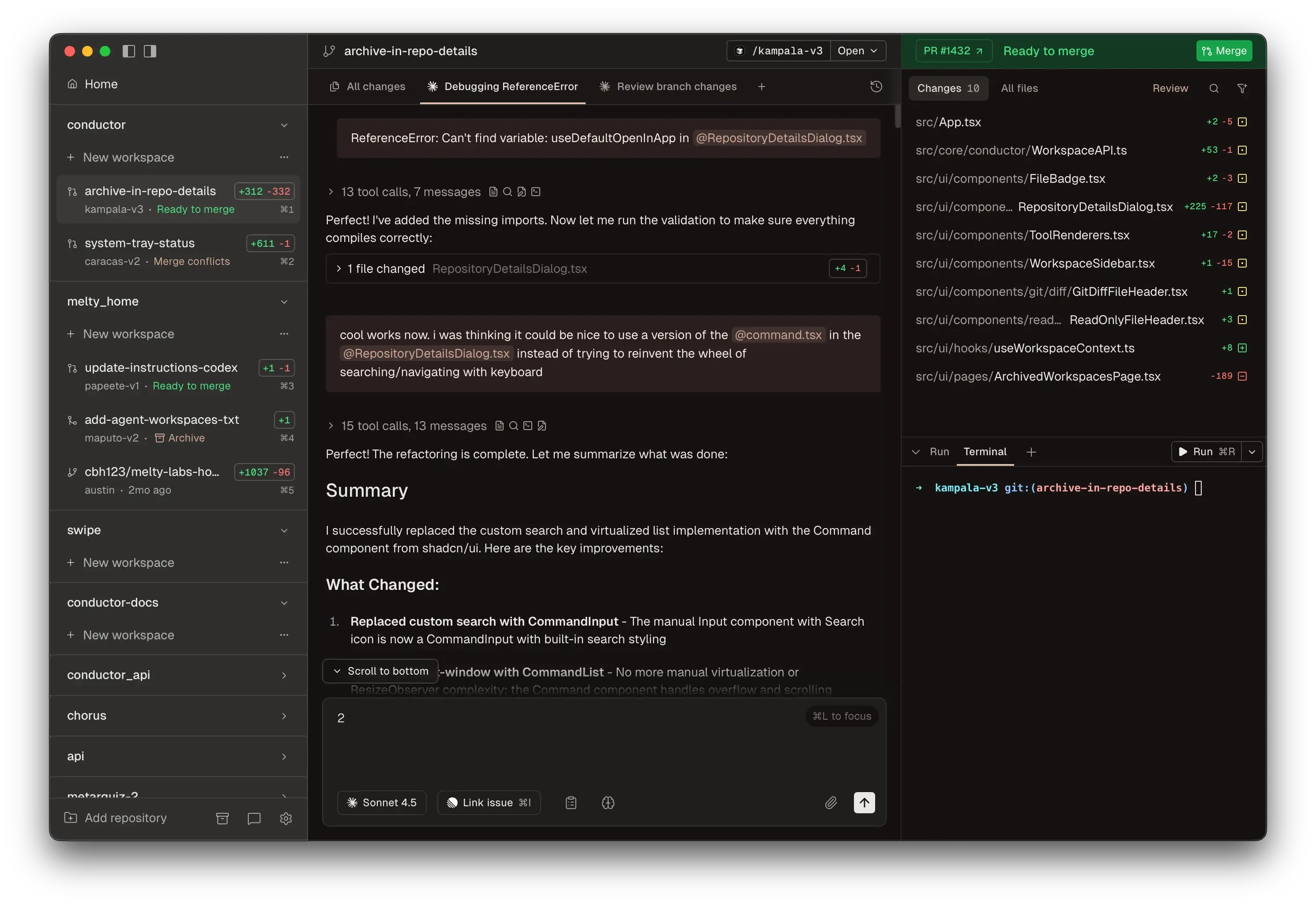
Claude Desktop now supports a Claude Code UI too, but I just prefer Conductor’s UI for this kind of work. Something about seeing all your agents and their diffs laid out side by side clicks for me.
I find it works best when the repo is small enough to fork quickly on disk. You spin up multiple workspaces, assign different tasks, and review diffs when they’re done. They also have a manual mode now that lets you edit code directly in the app. I’ve had three agents ship three separate features before I finished my morning coffee. That’s not a metaphor.
One caveat: for a real-world monorepo that’s gigabytes large, the forking approach doesn’t work well locally. macOS agentic coding apps are mostly part of my prototyping and side project workflow, not my day-to-day work on our main codebase.
Codex macOS App
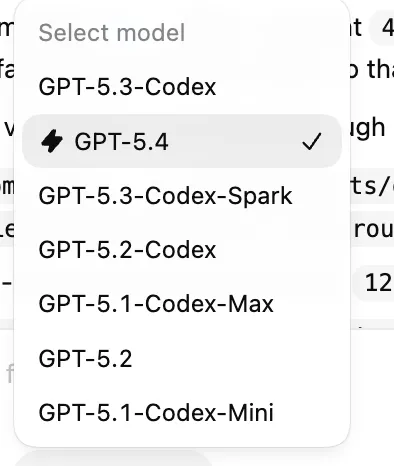
My usage of Codex surged after the macOS app launch on February 2. I’d used the CLI on and off in 2025 but it never clicked. The dedicated app with GPT-5.3-Codex made it way better. My Codex vs Claude Code usage is roughly 50-50 now.
What it does well is inline steering. You can view files inside the app and comment on specific parts of the code to direct the agent.
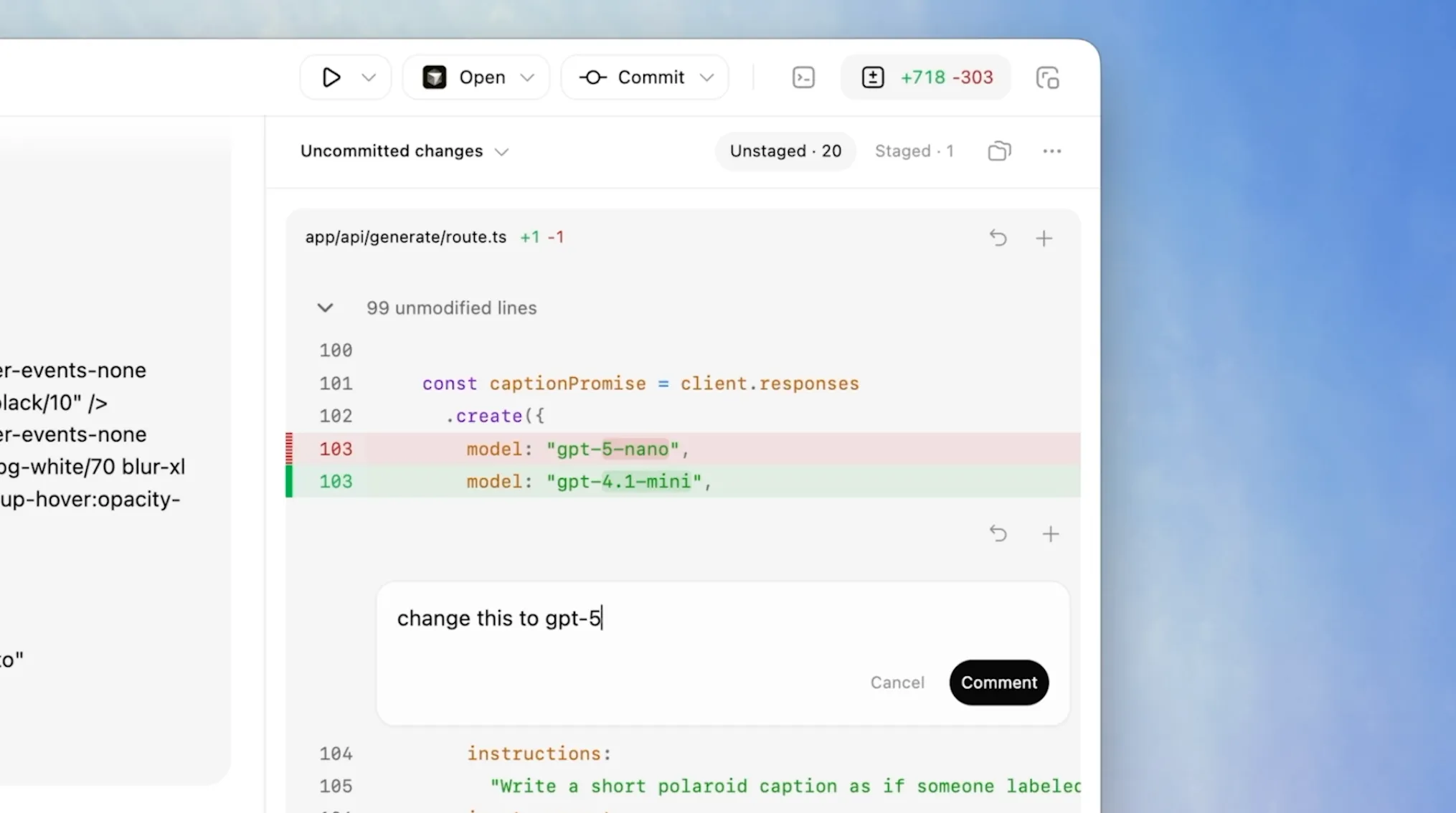
That sounds small, but it changes the interaction model. It feels less like chatting with a model and more like leaving review comments for a strong junior engineer.
The app got better with GPT-5.4 (released March 5), which brings native computer-use capabilities and a fast mode for quicker inference. The new Playwright Interactive skill lets the agent visually test apps as it builds them. You need to enable js_repl to use it.
Happy
I kept running into this problem: I’d spin up a few agents on a side project, go do something else, and come back to find them all stuck waiting on me. Happy fixed that. It’s basically Claude Code on your phone. I can see what my agents are doing and approve things without being at my laptop. Anthropic has their own Remote Control now too, but I started with Happy and it also works with Codex.
2. Let Agents Verify Their Own Work
The second bottleneck is review. Agents produce code faster than I can read it carefully. If they can’t verify their own changes, I become the QA team.
Agent-Browser + Playwright Interactive
When using Claude Code, I have it use agent-browser to spin up the app locally and visually confirm things work. The tool’s snapshot + refs system sends the agent lightweight element references instead of massive accessibility trees, which avoids context rot from bloated page representations filling up the context window.
When using Codex, I lean on Playwright Interactive instead, a code-execution-based approach to agent self-testing. Replit’s engineering team wrote a great post on why this beats fixed browser-automation tool calls. With agent-browser, the agent is limited to whatever commands the CLI exposes: snapshot, click @e1, type @e2, etc. It’s a fixed set of actions. With Playwright Interactive, the agent writes and runs arbitrary Playwright scripts via Codex’s js_repl tool: for loop, multi-step flows, the full JS language instead of a fixed command set.
My longest single-agent session using agent-browser ran for 2.5 hours straight. I left it running, went to the gym, and came back to a finished feature. Here’s a screenshot of that agent 62 minutes in:

I checked the transcript afterward. It went down a few wrong paths before figuring it out, but it kept going on its own. I do less AI babysitting thanks to the setup.
3. Make AI-Written Code Reviewable
The third bottleneck is that diffs stop being enough. Once a lot of code is agent-generated, I care not just about what changed but why the agent made those choices.
Entire stores the AI reasoning behind every code change in a shadow branch in git. I’ve started reviewing PRs where the code was entirely agent-generated, and the diff alone doesn’t tell me much. I want to know what prompt was used, what the agent tried before it got to the final version. Entire treats that reasoning trail as part of the artifact, not disposable exhaust.
4. Reduce the Non-Code Backlog
Coding is maybe half the job. The rest is docs, comms, forms, meetings, and research. These are the tasks where I’m still doing most of the work manually, so this is where I feel the bottleneck most.
Claude Cowork
Cowork is what I reach for when I need to automate boring computer tasks that aren’t coding. You use it through the Claude Desktop app, and it pairs with the Claude for Chrome extension so it can actually click around in your browser for you.
Recently I had a batch of repetitive online forms that asked similar questions over and over, plus required a supplementary Word doc. These forms were behind a login, and this is where Claude for Chrome shines: it uses your real Chrome session, so it already has your credentials and cookies. No need to hand over passwords.
I drafted the doc with Cowork, then had it fill the forms via the Chrome extension. Five hours of work became one.
Typeless
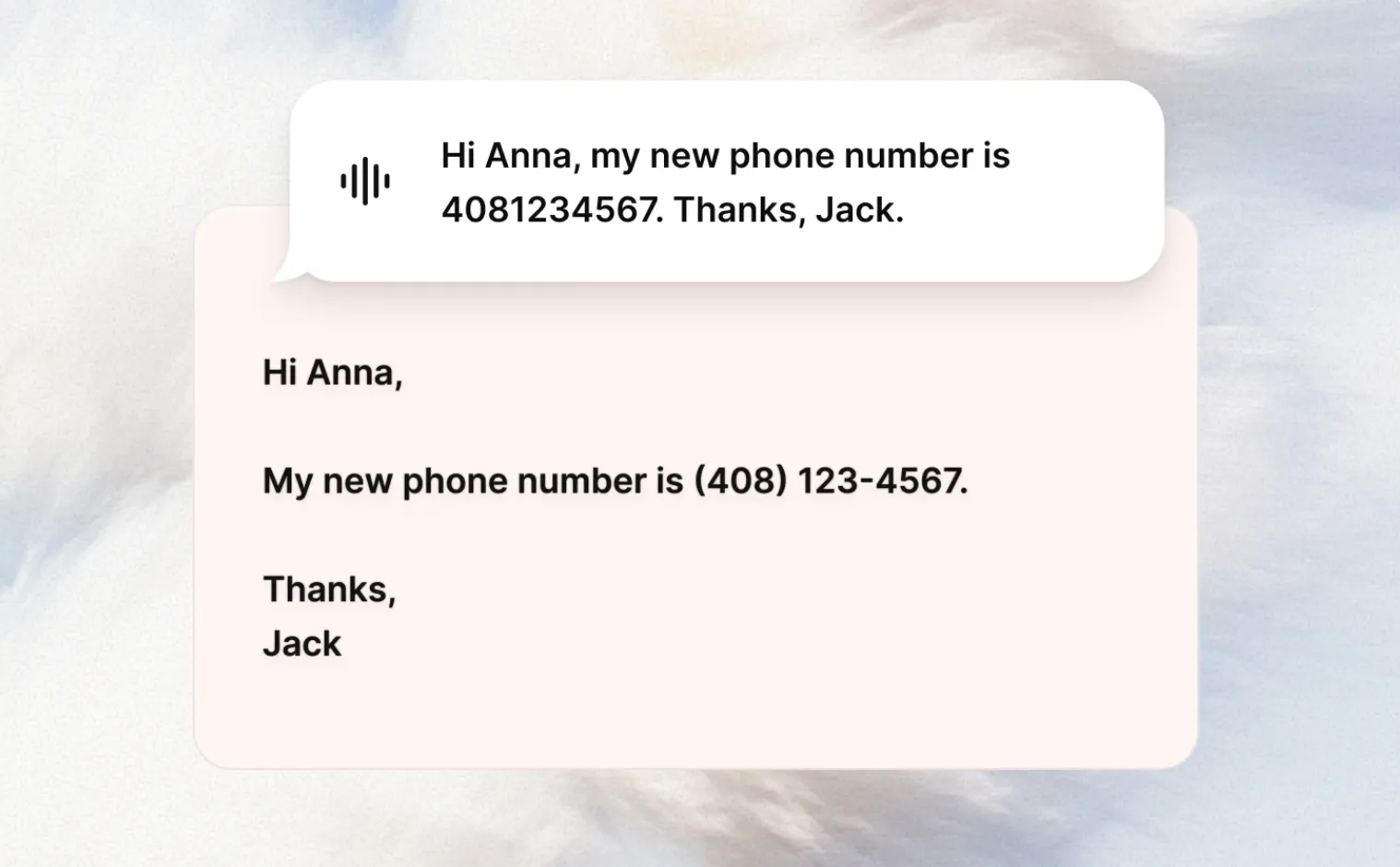
Typeless is my daily driver for voice input on both my phone and computer: vibe coding, Slacking, emailing, all of it. The auto-reformatting is the main reason I use it. You talk with “um”s and messy sentences and it turns it into clean text that fits the app you’re in.
I’ll ramble for 30 seconds about three separate ideas and get back clean bullet points. The “speak to edit” feature lets you select text and dictate changes, which works better than I expected. It also adapts tone per app: casual in Slack, polished in Gmail.
I do have two complaints as a very happy user. First, it sometimes triggers web search when I just want speech-to-text. If my dictation happens to sound like a question, Typeless interprets it as a search query and I get a full LLM response back on my screen instead of a transcription. Confusing when all I wanted was to dictate a message. Second, if you use it a lot, your throat will hurt. I’ve had to cut back on dictation some days just to save my voice. Not a problem I expected to have as a software engineer.
Quick Mentions
A few tools that don’t need a full section but have earned a place in my workflow:
Notion AI does solid meeting note summaries and its deep research feature occasionally surfaces things I wouldn’t find through manual searching. Not life-changing, but consistently useful.
ElevenLabs Reader converts any URL into natural-sounding audio. I use it when I’m exercising or walking. I listened to Google DeepMind’s entire “Welcome to the Era of Experience” paper this way. A 30+ page research paper, consumed on a run.
Poe is how I access all the state-of-the-art models (Nano Banana 2, Claude 4.6 Sonnet, GPT-5.4) without managing a dozen accounts and API keys. I build a lot of small AI apps on my own time, and being able to switch between models via one API key without juggling multiple platforms saves real friction. Disclaimer: I work at Quora, which builds Poe.
alphaxiv is where I read AI papers now. It layers AI tools on top of arXiv: a built-in LLM assistant that lets you chat with any paper, ai-generated blog post based on paper, and fast similar-paper discovery.
The next frontier isn’t just better code generation. It’s better human-in-the-loop workflow design. How do you write specs agents can follow? How do you review systems instead of lines? How do you keep velocity high without losing maintainability?
That’s the layer I’m most interested in now. This stack is just my current, partial answer to that problem.
If your workflow solves these bottlenecks differently, I want to hear about it. You can find me on LinkedIn.
Appendix: What Fell Out of My Stack
This section will probably change the fastest. I want to revisit it every few months and see what comes back.
IDEs
Cursor. I was a fan until April 2025, when I went all-in on Claude Code for agentic coding. Cursor has since shipped great features (bug bots, code review), but the dev community around me at Poe and in the broader SF AI circles had already migrated to CLI agents. The switching cost wasn’t justified by incremental GUI features. I still occasionally open Cursor as an IDE to browse files other agents touched. This blog post was typed in Cursor, ironically.
Google Antigravity. A lot of hype when it launched in November 2025, but I kept getting throttled on LLM requests. The experience wasn’t differentiated enough from Claude Code or Codex. I could see myself revisiting it if I were deeper in the Google ecosystem.
Warp. Once a great terminal, now pivoted into a terminal-based agentic environment. They’ve been marketing hard around their Terminal-Bench #1 ranking (52% task completion), but benchmarks for terminal agent tasks don’t really map to my daily workflow. I care about how well an agent handles a real feature in my codebase, not whether it can untangle mangled Python dependencies in an isolated test. Hard to justify another subscription when Conductor and the Codex macOS app exist.
Close Calls
ChatGPT Atlas. A cool AI-native browser with genuinely fast LLM search. But earlier versions had noticeable glitches on several websites, and I don’t find the browser-use agent useful enough to switch from Claude Cowork + Chrome.
Wispr Flow. A solid voice dictation product. I used it in December 2025 but I prefer Typeless’s reformatting and tone-matching.
Techniques
“Ultrathink” prompting. For a while, adding “Ultrathink” to your Claude prompt triggered deeper reasoning. It was deprecated in January 2026, then restored after community backlash. Now I just set 4.6 models to “high effort” by default in Claude Code.
Ralph Loop. The idea is you run the same prompt in a loop, giving each agent a fresh context window while progress persists in files and git. When one agent fills its context, the next picks up where it left off. People have reported shipping entire repos overnight this way. I get why it’s popular for long-running autonomous work, but for my personal projects I just don’t have enough tasks/specs queued up to justify it. My side projects are small and focused, and I’ve already had single agents running for hours on features. Running 5 parallel agent sessions is working well for me. Ralph Loop solves a problem I don’t have yet.